Contacts - Calls, Phone Dialer
- 4.5
- Rating
- 500.00K
- Installs
- Free
- Price
 Analysis by App-foxy
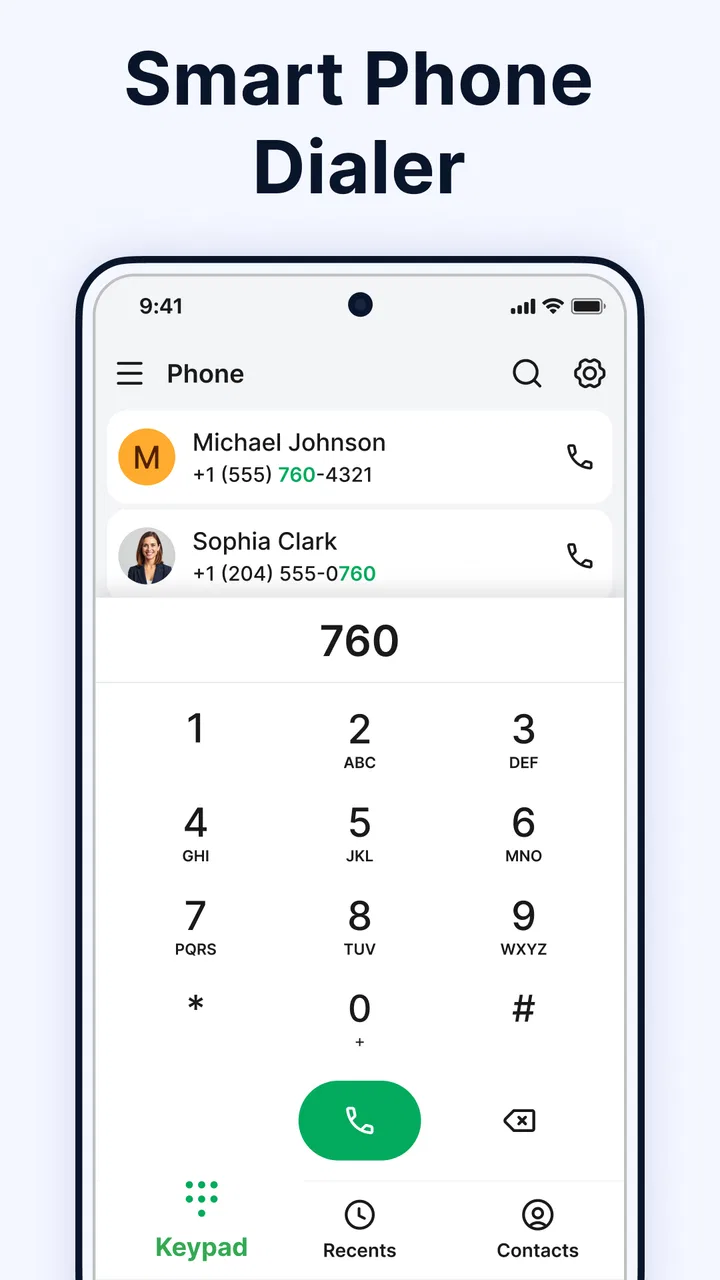
When I try a new phone and contacts app, I am not looking for decoration first. I want to know whether it helps me reach the right person quickly, keeps everyday information understandable, and gives me enough control to avoid accidental calls or edits. Contacts - Calls, Phone Dialer takes that practical route. It brings the address book, dialer, call history, and contact management into one communication-focused app rather than treating each task as a separate tool.
That sounds simple, but it matters in real use. A phone number may be saved under an old workplace, a family nickname, or several entries that have accumulated over time. The useful test is whether I can move from searching to calling to checking recent activity without feeling lost. My overall impression is that this app is aimed at people who prefer a direct phone utility instead of a crowded communication platform.
What the app is trying to solve
Contacts - Calls, Phone Dialer is a free Android app from Messages App Evolution in the communication category. Its central promise is not social networking or messaging discovery; it is the everyday organization of people and calls. I see the appeal for anyone who wants a single place to browse an address book, open a contact, use a phone dialer, and review call history.
You May Also Like

 Blood Strike: 2.5 Anniversary
Blood Strike’s Loadouts Turn Every Drop Into a Tactical Gamble
A close look at Blood Strike’s custom loadouts: how fast access to signature weapons reshapes its battle royale rhythm, rewards preparation, and narrows the gap between fights.

 Pandora - Music & Podcasts
Pandora’s Music Is Easy to Start, but Harder to Recover
Pandora’s strength is its low-effort path from a seed to a station. Its weak spot is how much confidence it asks you to place in connection, setup, and quiet recovery.

 8 Ball Pool
 Is Built on Rivalries, Rematches, and Routine
A close look at the rivalries, rematches, shared routines, and unanswered safety questions that turn a quick pool match into a persistent mobile community.

 Samsung Music
’s Quiet Strength Is Playing What You Already Own
Its reach comes less from spectacle than from dependable access to a personal library. That simplicity is both the app’s strongest retention engine and its ceiling.

 AccuWeather: Weather Radar
AccuWeather Review: A Quick, Clear Forecast for Everyday Decisions
For everyday plans, the best forecast is the one you can understand quickly. AccuWeather makes rain timing, radar, and local conditions easy to act on, with a few trade-offs.

 Hill Climb Racing
Why Hill Climb Racing Still Turns Crashes Into One More Run
A tiny car, a bumpy hill and one more upgrade: Hill Climb Racing keeps resurfacing because its simple chaos makes every near-miss feel personal.
More From Our News Desk



The app is available to users rated Everyone, which fits the straightforward nature of its purpose. It was released on September 9, 2025, and the current version is 2.0.12. It requires Android 11 or newer, so it is better suited to relatively recent phones than older devices that are still being kept in service.
Its public reception gives it a reasonable starting point: the app holds a 4.4 average from around 1.2 thousand ratings, with over 100 thousand installs. I would not treat those figures as proof that it will suit every phone, because dialer and contacts behavior can vary with Android versions, manufacturer software, and default-app settings. Still, they suggest that the basic idea has found an audience.
In my experience, the strongest reason to consider it is concentration. Instead of jumping between a contacts screen, a separate call log, and a keypad, I can think of the app as a working phone book with calling tools attached. That is useful for people who make ordinary calls often and do not need a broader communications hub.
Daily calling feels more organized when the tools stay together
A realistic example is calling a service provider whose number I saved months ago. I can start by looking through contacts, open the matching entry, and then use the call function without copying the number into another application. Afterward, the call history gives me a place to find the interaction again. That sequence is more helpful than any individual feature because it reduces the small handoffs that cause mistakes.
The same workflow works for family calls. If I have several similar names, checking the contact record before dialing is a sensible habit. It gives me a moment to confirm that I am choosing the correct person rather than relying on a quick tap from a long recent-call list. This is one of the quiet strengths of a combined contacts and dialer design: the address book can be part of the decision, not merely a storage area.
I also think the app can suit users who find a phone manufacturer’s built-in interface confusing. A dedicated alternative may offer a clearer mental model, especially for someone who wants contacts, call history, and dialing to feel like parts of one tool. The trade-off is that replacing familiar system apps can introduce its own learning curve, so I would not switch purely because the icon or layout looks different.
Contact management deserves more attention than the keypad
The keypad is easy to understand in almost any phone app. The more important test is what happens around it: finding a person, checking the saved number, and keeping the address book usable over time. Contacts - Calls, Phone Dialer is most relevant when those supporting tasks matter as much as making a call.
One practical tip is to use the contact list as a verification step before calling unfamiliar or similarly named entries. That is especially useful when a person has multiple numbers or when an old entry may no longer represent the number I expect. I would also review the contact details before editing them, because a fast cleanup session can accidentally replace useful information if I am not paying attention.
Another useful workflow is to treat call history as a follow-up tool rather than just a list of missed calls. After an important conversation, I can return to the recent record to identify the number I used. That helps when I need to call back but did not save the person immediately. It is a small behavior, yet it makes the app more practical for appointments, deliveries, repairs, and other one-off conversations.
There is a trade-off here. A unified phone utility is convenient when I already know the person or number I need. It is not automatically a replacement for a full relationship-management system, a business contact database, or a messaging platform. If I need extensive notes, team sharing, conversation threads, or advanced contact administration, I would look at a tool designed around those needs instead.
Trust starts with what the app visibly asks me to do
Phone and contacts applications deserve more scrutiny than a casual game because their purpose naturally involves sensitive moments. I would pay close attention during setup to every permission prompt, system dialog, and request to become the default phone or contacts handler. Those choices affect how much of my calling routine moves through the app.
I would not approve a request automatically just to reach the main screen. My approach is simple: read the wording, decide whether the requested access matches the task I want to perform, and decline anything I do not need. If a permission is required for a particular action, I prefer to grant it at that moment rather than treating setup as a blanket approval.
The app’s usefulness depends on interaction with phone and contact information, so the most important trust decision is not the rating or the visual design. It is whether I am comfortable using it for those tasks on my own device. I would inspect the permission controls in Android settings and revisit them after installation, especially if I later stop using the dialer or only want to browse contacts.
I also distinguish between a permission and a broader data-practice claim. A system prompt tells me what access the operating system is being asked to mediate; it does not, by itself, answer every question about storage, sharing, retention, or account behavior. I therefore avoid assuming that a clean-looking interface means complete privacy, and I avoid assuming the opposite without evidence. The right habit is to use the visible controls and read the app’s current disclosures before making a personal decision.
When personal data is on screen, small habits matter
The most data-sensitive moments are obvious: opening the address book, viewing a number, dialing someone, and reviewing calls that have already taken place. I would be careful when using the app in public, particularly if the recent-call screen displays names or numbers where another person can see the phone.
Shared devices deserve extra caution. If another family member uses the same phone, I would review the device’s lock-screen notification behavior and general privacy settings rather than assuming the app can solve every exposure risk. The app may organize calling information, but the surrounding Android environment still influences what appears in notifications, recents, and system surfaces.
I would also avoid treating call history as a permanent filing system. If an entry is no longer useful, I would consider whether keeping it visible creates confusion or unnecessary exposure. Before deleting or editing anything, I would make sure I understand whether the action affects only the app’s view or the underlying phone data. That distinction is worth checking because contacts and call records can be connected to system-level behavior.
For people who manage work and personal calls on one phone, the app may be convenient but requires discipline. I would use clear contact names, check the number before dialing, and avoid saving sensitive details in a field unless I genuinely need them there. These are not glamorous features, but they reduce the chance that an address book becomes cluttered or that private information is exposed during an ordinary call.
How much control does a user really have?
User agency here means more than being able to press a call button. It means choosing whether the app becomes part of the default calling workflow, deciding which permissions to allow, and being able to change those decisions later through Android. I would make those choices deliberately instead of accepting every prompt as the price of installation.
Someone who wants to test the app without fully committing can begin with a limited routine: browse the interface, check whether contact search feels natural, and see whether the call history is understandable. Before making it the main phone tool, I would confirm how the device handles default-app selection and whether returning to the manufacturer’s dialer is straightforward. That is a sensible safeguard whenever an app overlaps with core system functions.
I would also keep the app updated through the official Android distribution channel. The current version is 2.0.12, and updates can change behavior, compatibility, or visible controls. After an update, I would quickly revisit permissions and settings rather than assuming my previous choices still describe the experience exactly.
The absence of an account-centered workflow can be appealing to someone who simply wants a phone utility, but it also means I would not expect the kinds of cross-device management associated with cloud-based communication services. For a person who wants contacts synchronized across several devices, shared address books, or a large online communication history, a platform built around an account may be the better fit.
Where it fits beside the usual alternatives
The closest alternative is the dialer and contacts app already installed on an Android phone. That built-in option usually has the advantage of deep system integration and familiarity. If it already handles calls, contacts, and history cleanly, switching may offer little benefit. I would choose this app when its organization feels easier for me, not simply because it performs the same basic actions.
Another alternative is a messaging-centered communications app. Those services are better when my main activity is text, group conversation, media sharing, or internet calling. Contacts - Calls, Phone Dialer is more focused on the traditional phone workflow, so it makes sense for users who still rely heavily on ordinary calls and want the related records close at hand.
There are also contact-management tools aimed at professionals. They may be stronger for labels, customer notes, duplicate handling, exports, or shared business records. This app is a more natural choice for personal calling and straightforward address-book use. I would skip it in favor of a specialized business system if my contacts need to be managed by a team or connected to a sales process.
The key comparison is therefore not “which app has the most features?” It is “which app gives me the right amount of control without adding work?” For a personal phone, a focused dialer can be refreshing. For a complicated contact operation, simplicity may become a limitation rather than a strength.
Who should use it, and who should pass?
I would recommend trying Contacts - Calls, Phone Dialer if I wanted one app for an address book, keypad, and call records, especially when the stock phone interface felt awkward. It is also a reasonable candidate for someone who prefers direct calling over a social or messaging-heavy experience. The free price removes the financial barrier to testing it, although the more important question is whether its permissions and workflow match my comfort level.
I would be more cautious if I depended on manufacturer-specific calling features, complicated contact synchronization, or a business-grade contact database. I would also skip a replacement dialer if my current system app already feels fast, clear, and trustworthy to me. A different option is better when deep integration, multi-device continuity, or advanced administration matters more than having a separate interface.
Before settling on it, I would perform a short personal test: find several contacts, distinguish between similar entries, review recent calls, and check the permission and default-app screens. I would then make a normal call and see whether the return path to the contact record and history feels natural. That test reveals more than a quick look at the keypad because it covers the moments where mistakes and confusion usually happen.
A careful recommendation for everyday phone use
My final view is measured but positive. Contacts - Calls, Phone Dialer is a practical communication app for people who want calling tools and contact organization in the same place. Its value comes from the complete routine: locate a person, verify the details, call, and find the interaction again when needed. That is a useful shape for an everyday phone utility, even if it is not the right answer for every kind of contact management.
The choice I would make depends on control as much as convenience. I would install it only after reviewing the permissions and default-app decisions, then judge it by real calls rather than by the keypad alone. If the app makes my address book easier to navigate without asking me to surrender more control than I want to give, it is worth keeping. If the built-in dialer already does the job or I need advanced synchronization and business features, I would stay with the existing tool or choose a more specialized alternative.
For a free app from Messages App Evolution with a focused purpose, it is worth a careful trial on a compatible Android phone. I would describe Contacts - Calls, Phone Dialer as a sensible option for straightforward personal calling, provided that the user remains attentive to permissions, contact visibility, and the difference between a convenient interface and a complete privacy solution.
FAQs for Contacts - Calls, Phone Dialer
01What features does the Contacts - Calls, Phone Dialer app offer?
The Contacts - Calls, Phone Dialer app provides a comprehensive suite of features, including smart call blocking, caller ID, and contact management. Users can easily organize their contacts, set up speed dials, and utilize a powerful search function to find contacts quickly. Additionally, it offers customization options for themes and ringtones.
02Is the Contacts - Calls, Phone Dialer app compatible with all devices?
The app is designed to be compatible with most Android and iOS devices. However, it's always a good idea to check the app's requirements on the app store to ensure it works seamlessly with your specific device model and operating system version. Regular updates also help maintain compatibility.
03Does the app require an internet connection to function?
While the app's basic features such as dialing and contact management do not require an internet connection, some advanced functionalities like caller ID and spam detection may need internet access. This ensures real-time updates and accurate identification of unknown numbers.
04Are there any privacy concerns with using the Contacts - Calls, Phone Dialer app?
The app prioritizes user privacy and employs encryption to protect your data. It may request access to your contacts and call logs, but this is necessary for its core functionalities. Always review the app’s privacy policy and permissions before installation to understand how your data is handled.
05Is there a cost associated with using the app?
Contacts - Calls, Phone Dialer is available as a free download with optional in-app purchases. These purchases might unlock premium features or remove ads for a more streamlined experience. Users can choose to enjoy the free version fully or upgrade based on their preferences and needs.
Pros
- Intuitive user interface for easy navigation.
- Seamless integration with existing contacts.
- Quick access to favorite contacts.
- Customizable themes and layouts.
- Efficient call history management.
Cons
- Limited advanced features for power users.
- Occasional lag on older devices.
- Ads can be intrusive at times.
- No cloud backup for contacts.
- Lacks integration with third-party apps.

Contacts - Calls, Phone Dialer
Gallery